Review Comments (12) Screenshots (1) Questions & Answers (10/7) Votes (418) Awards (1) Wiki  
(418)
Hewlett-Packard
4.0.10.0
h10025.www1.hp.com
Freeware
261 777 people

The download link is unavailable now. Try visiting the developer's home page.


Review

This review applies to version 3.0 The latest version of this software will soon be reviewed by our informers.

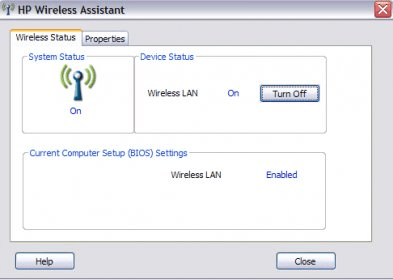
HP Wireless Assistant is a user application that provides a way to control the enablement of individual wireless devices (such as Bluetooth, WLAN, or WWAN devices) and that shows the state of the radios for these wireless devices. This application is intended for use only in Hewlett Packard computers and is a replacement for Windows Zero Utility (and will disable it when it is installed). It provides a separate graphical interface and allows for a greater control of wireless networks and connections.
Report a wrong version Report a wrong program title Suggest a correction

Screenshots

MAIN SCREEN MAIN SCREEN

Latest comments

Guest #14827965(beginner) 10 months ago 
I tried to install
HP Wireless assistant 4.0.10 instead of
HP Wireless Assistant 3.0.
The install program stated this:
This computer system does NOT SUPPORT Wireless Assistant 4!
This computer system is:
Compaq Presario CQ50-107NR Notebook PC
w/AMD Athlon X2 64-bit
Wiindows Vista Home Premium - 32 bit edition
I just hope the setup program did NOT uninstall version 3.0 yet!
Reply
Lisa G. Cobb(beginner) 10 months ago 
I had received the same notification when I tried to install the update, but at the end it states that no changes have been made to the system, so it did not change the wireless assistant at all. Guess that maybe this update is only for certain computers and not for all computers out there.
Reply
Greg(beginner) Last year 
Believe it or not I got my radio button to work by first, shutting down then holding the radio button in through POST. The trick is to let go of the radio button shortly after logging in. It seems that the Laptop has somehow configured the radio button to be backward. Im thinking when its off its on and vise-versa. Ya got to trick it back the other way. I have had this problem for some time now. It seems to stay corrected for a while then the problem returns.
Reply
Denis(fan) Last year 
Nice stuff, "must have" for notebooks
Reply
Add new comment All 12 comments

E-mail Address:

Password:

Register now »

Forgot password?

Sign in with:
Download Software Informer Client
Copyright © 2012, Informer Technologies, Inc. About| Privacy and terms| Help| Feedback & Support| Partners program
